
A great restaurant soundtrack or business background music needs two ingredients: reliable sound equipment and a legally cleared music source. Many owners invest in speakers first and only later discover that a personal streaming app on a phone is the weak link — both operationally and legally. This DIY-oriented guide walks through coverage planning, core hardware, cabling habits, playback devices, and how SyncPoint fits as the commercial music layer.
If you want your restaurant to stand out, invest in quality business background music.
Choosing the right business background music can significantly enhance the dining experience.
Establishing a theme for your business background music can create a memorable experience.
Using business background music is essential for setting the right atmosphere.
You do not need a stadium-grade rack to get started. You do need intentional zones, enough clean amplification, and a source that is allowed in a business. If you are still using personal Spotify on the floor, read Is Spotify legal for business? before you finish shopping for speakers.
The right business background music can help with customer retention.
1. Map where music must be heard
Walk the room at the times that matter: lunch rush, dinner seating, patio weather days, late bar. Note dead spots, noisy HVAC corners, and places where music fights conversation. Decide whether the bar should feel louder than dining, and whether restrooms or host stands need soft fill.
- Dining room and booth zones
- Bar and high-top energy
- Patio / sidewalk seating (weatherproof speakers if needed)
- Entry / waiting area
- Back-of-house (often quieter or separate)
2. Core hardware building blocks
- Speakers — commercial ceiling or surface-mount speakers are common; match sensitivity and coverage to ceiling height and seating density
- Amplifier or powered mixer — enough headroom so you are not clipping at busy volumes
- Source device — tablet, mini PC, or stick PC dedicated to music (not a manager’s personal phone)
- Network — prefer ethernet for the player device when possible; strong Wi‑Fi as backup
- Optional zones — simple multi-zone amps help when patio hours differ from dining
Fancy DSP can wait. Consistency and clarity beat expensive features you never adjust.
Incorporating business background music can elevate the dining experience.
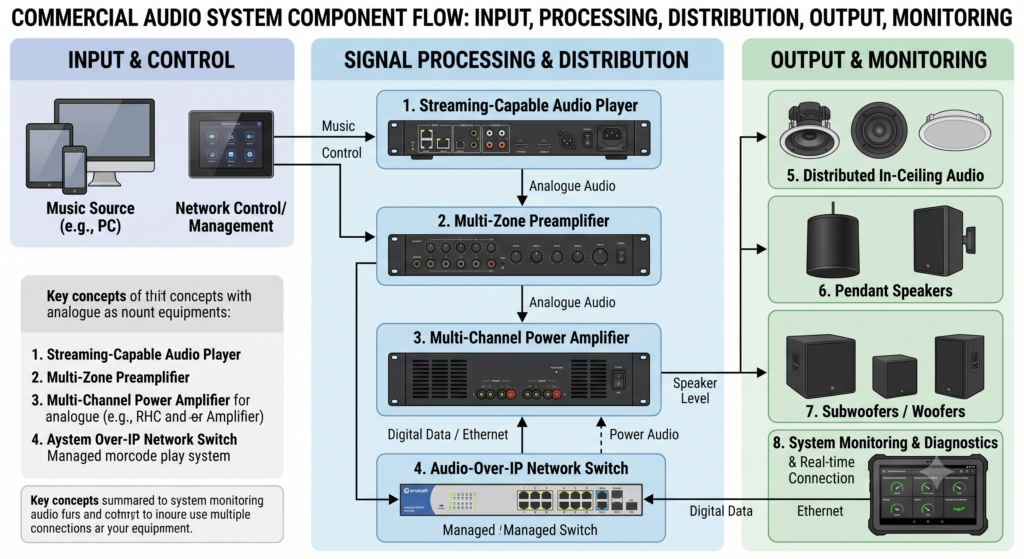
3. Cabling, mounting, and volume culture
Keep speaker wiring neat, protected, and installed to local code. If you are bridging multiple rooms, hire a low-voltage pro rather than improvising with consumer speaker wire across walkways. Mount speakers so they cover tables evenly instead of blasting one wall.
Train staff on target volume. Music should support conversation, not win a fight with it. A house guideline (“dinner = X on the amp”) prevents every shift from reinventing the vibe.
4. Choose a commercial music source
Hardware does not create a music license. Replace consumer apps with commercial streaming or download packs. PRO context: ASCAP, BMI & SESAC explained. Delivery choice: streaming vs Music Packs. Cost framing: commercial background music cost.
5. SyncPoint on a DIY restaurant system
- Choose a plan on pricing and complete checkout
- Open your secure player / stream URL on the dedicated device
- Route audio to the amp (HDMI ARC, USB DAC, headphone-to-line, or dedicated output depending on device)
- Disable sleep/auto-lock; consider kiosk/fullscreen mode
- Remember: one subscription = one physical location (licensing)
Prefer local files on an existing media player? Browse Music Packs and the pack license.
6. Always-on habits that prevent “music is down” nights
- Label the music device and power supply so closing staff do not unplug it
- Use a small UPS if brief power blips are common
- Bookmark the player URL; do not rely on a buried email thread
- Give one manager ownership of genre/station changes
More on the no-app approach: play music in a business without an app.
Consider a variety of genres for your business background music.
7. Related verticals
Retail pacing differs from dinner service — see retail playlist ideas. Churches often reuse sanctuary speakers for lobby ambient — church ambient music. For fine risk context, keep hidden licensing costs handy.
Bottom line
Plan coverage, buy enough clean amplification, dedicate a playback device, and feed it cleared commercial music. That combination beats a random phone playlist every night of the week.
Need a recommendation? Contact SyncPoint · FAQ · Insights.
Common DIY mistakes (and easy fixes)
- Using a personal phone as the permanent source — replace with a dedicated device and commercial stream/packs
- Under-amplifying a large dining room — add headroom so dinner volume is clean, not clipped
- One speaker aimed only at the bar — rebalance coverage for tables
- No labeled power/cable path — closing staff unplug the player by accident
- Changing stations every hour — pick a house default and change deliberately
If you want a second opinion on plan vs pack for your room, contact SyncPoint. For shoppers and sanctuaries with similar AV patterns, see retail playlists and church ambient.
Utilizing business background music effectively can boost the overall ambiance.
Align your business background music with your brand identity for better resonance.
Implementing a suitable playlist for your business background music is vital.
A well-curated business background music selection can enhance the overall mood.
Regularly updating your business background music ensures variety for customers.
Feedback on the business background music can provide insights for improvement.
Enhancing your service with business background music can lead to increased sales.
Remember, the right business background music should complement the dining experience.